Wednesday, December 17, 2014

Label, For, or While loop performance test

  • This conversation deserves a blog entry.  
  • A: If you find different ways to accomplish the same thing, make sure to test the performance of the code each way at least 3 times and average the results just like in other science classes like physics. I do not see any noticeable difference in any of these implementations. Do you?

  • A A loop is nothing else, but an if statement with a jump. What you do after the comparison and before the jump does not matter. It will not be a jump that slows your code down, but the block that does the work. If you find an example and you can test for performance issues, than we have a case, but until then this is just a rumor. You will also investigate if the code is using the stack or using dynamic heap memory, since that will affect the performance of a code running, but not he simple jump.

Test results do not show any difference.  Any suggestions, comments?  Please, include sample code and/or testing methodology to show any difference that you might believe exists.


Friday, September 26, 2014

Back to basics - NTFS Data Runs

This is not really the basics, but an advanced knowledge from a technical point-of-view.  Since it is a published process explained in great details, it becomes basic knowledge.  Those in non-scientific fields are not used to calculating and verifying steps and procedures and that basic premise moves the field of digital forensics into an educational definition of STEM fields.  STEM stands for Science Technology Engineering and Math.

This post will discuss the complex process and understanding of data storage in the New Technology File System ( NTFS ) specifically the $80 attribute's lesser understood structure of it's data runs.


This image is from the book "Guide to Computer Forensics and Investigations", September 28, 2009, by Bill Nelson (Author), Amelia Phillips (Author), Christopher Steuart (Author) 


Thus, based on the image above, the data run can be extracted and analyzed for the actual data cluster locations.


If you want to create the same analysis and documentation of the data clusters, here is the actual string of the data runs: 32B1078C8C0022630795ED32BC063C360122350302FA210B6CFE229E01E904

The example above contains 6830 clusters for the file with positive and negative offsets to cluster runs.  You can not get any more complex than this one.  If you understand this example, you understand how NTFS saves non-resident files.  If you are into programming, I would suggest you do this analysis by hand or with a simple application like I did here with Excel before attempting to write a program in a lower level programming language.

Good luck practicing and getting better in understanding technology at a deeper level.

Sunday, September 21, 2014

Drive size IEC vs. ISU

What is the big deal?  The size of the drive is reported by the forensic tool and I just need to bookmark it or document it.  Forensic tools are tested and vetted in courts, so I don't need to worry about them.  Right?  The answer is not that simple since 1998.  In 1998 the International Electrotechnical Commission (IEC) decided to resolve the old standing conflict of orders of magnitudes like kilo or mega that are used to represent a Base-10 prefix and not a Base-2 prefix.  Thus, a 1000m run can be referred to as a 1Km while a 1024 Byte memory block is referred to as 1KiB, 1 kibibyte.

The calculation does not change, only the unit of measure reflects the binary nature the order of magnitude.


There is not much focus on this change and many experts might not even know about it, but it is annoying if the tools we use do not confirm to this changed standard.  As long as we can refer to the byte value, there is no problem since only the prefix that needs to be examined for the correct spelling.

I have seen the hard drive manufacturers following this new standard for years now while the software vendors lagging behind.

http://www.seagate.com/www-content/product-content/nas-fam/nas-hdd/en-us/docs/100724684.pdf
i.e.
7814037168 * 512 = 4000787030016 / 1000000000 = 4TB.

So, what do we see in forensic tools, in operating systems, and in generic tools?  Well, it depends.

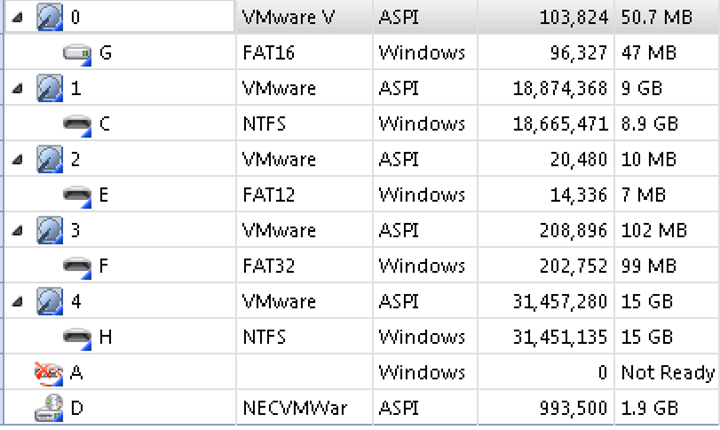
AccessData FTK Imager 3.1.3 calculates the drive sizes for an easy and quick reference.  We can also easily find the drive sector sizes in this tool.

Physicaldrive0 Sector Count = 103,824      =  53157888 bytes
Physicaldrive1 Sector Count = 18,874,368 =  9663676416 bytes
Physicaldrive2 Sector Count = 20,480        =  10485760 bytes
Physicaldrive3 Sector Count = 208,896      =  106954752 bytes
Physicaldrive4 Sector Count = 31,457,280 =  16106127360 bytes

Reference calculations:
Physicaldrive0 Size = 50.69MiB  or  53.15MB
Physicaldrive1 Size = 9GiB          or  9.66 GB
Physicaldrive2 Size = 10MiB       or  10.48MB
Physicaldrive3 Size = 102MiB     or  106.95MB
Physicaldrive4 Size = 15GiB        or  16.1GB


Sample calculation based on PhysicalDrive4
Total Sectors
31,457,280
Bytes
16106127360
International Electrotechnical Commission (IEC)
International System of Units System ( Metric )
Kibibytes
KiB
15728640
kilobyte
kB
16106127
megibyte
MiB
15360
megabyte
MB
16106.127
gibibyte
GiB
15
gigabyte
GB
16.106127

I'm not really sure where FTK Imager got some of the values for its physical size, drive 1 seems to be in GiB, drive 2 is a mystery number, drive 3 seems to be in MB, and drive in GB.

Encase_forensic_imager_7.06 also shows the cluster count and the drive sizes in an easy format.  It also lists the sizes in a Base-2 format while using the Base-10 unit of measures, but it is more consistent than FTK Imager.


Windows Management Instrumentation Command-line (WMIC) shows the physical devices, but the size and total sectors are not the physical size values.

Windows shows the physical sizes, but not even close to the actual size of the devices, but we know from the MBR master partition table calculations that partition size calculations are based on Base-2 calculations.


Example value calcualted from MBR of Disk 1, first partition entry.
00200300 = 0x32000 = 204,800 sectors in partition, thus the value of the number of bytes in the partition is 204800*512 =  104857600 bytes / ( 1024 * 1024 * 1024 ) = 100MiB

So, Microsoft is using the wrong measures of unit to display storage device size information. Disk 2 and Disk 3 size values are way off from either of the calculated values, but those that are the right values, those are calculated by the Base-2 conversion method, so the unit of measures should be MiB and GiB not MB and GB.

Linux on the other hand is using the Base-10 conversion for the correct unit of measures in MB and GB.

/dev/hda size was an anomaly and I was not able to find a suitable explanation why the value was off, but it might have had something to do with a virtual IDE hard drive.  I have verified the existence of sector 104447 using dcfldd and xxd  ( dcfldd if/dev/hda bs=512 skip=104447|xxd ).  Even though all other tools showed only 103,824 sectors on the drive, I did locate 104448.


/dev/sda->18874368 sectors consistent with other Windows tools, but the capacity is correctly calculated in MB to 9663MB or 9.66GB.

/dev/sdb->20480 sectors consistent with other Windows tools, but the capacity is correctly calculated in MB to 10MB.

/dev/sdc->208896 sectors consistent with other Windows tools, but the capacity is correctly calculated in MB to 106MB.

/dev/sdd->31457280 sectors consistent with other Windows tools, but the capacity is correctly calculated in GB to 16.1GB.

So, my conclusion is that Windows based software vendors did not make the adjustment in the last 16 years to label their storage device sizes properly.  The most surprising are the forensic tool vendors not seeing the need to label properly or show the proper capacity of the drives.  As long as the size is referred to in bytes, the values are correct and it might be needed to start referring to evidence size in bytes to avoid confusion.

Sunday, September 14, 2014

Back to basics - Operator Precedence

Why do we need to test forensic tools why the programmers compiled the code without any errors?  The concept of logical errors and algorithm implementations can not be detected by compiling code, they can be found by continuous testing with the right input and output needs to be monitored for the correct values.  We need to avoid garbage in, garbage out conditions for reliable tool testings.  One of the implementation issues that can be detected by testing is the operator precedence.

In this presentation, I wanted to talk about the order of operations that are ignored in many cases.  Order of operations are used by systems to evaluate the value of an expression by parsing the expression by operator precedence as defined for the given system.

Analyzing code requires not just pattern recognition to specific code, but also the recognition of logical errors that might have been exploited.

In this chart, I give an example of the flow of operator evaluation, but the accompanying video will give a more in-depth explanation.  http://youtu.be/7EQ5YZOU7tw

             You can practice operator precedence on the command line by setting variables 
             by arithmetic operations.                                                                                         
             C:\>set /a test=(9*9)*4/(9*(5*5*5)-(14-6))                                                               
             0                                                                                                                              

This operation can also represented in postfix notation and used with DC command line utility.  The above expression in postfix notation is 9 9 * 4 * 9 5 5 * 5 * 14 * 6 - / 

 Download UnxUtils.zip from
https://sourceforge.net/projects/unxutils/
Extract files from UnxUtils.zip to c:\temp
Change directory to
cd c:\temp\UnxUtils\usr\local\wbin
Type dc to start
dc

You will only see a blinking cursor, but that is your prompt and you can just type values.
Type
34
2
/
p

p is to print the result to the screen.  If you are done using it, type q to exit


 c:\Users\<UID>\Downloads\UnxUtils\usr\local\wbin>dc
9
9
*
4
*
9
5
5
*
5
*
14
*
6
-
/
p
0
q

c:\Users\<UID>\Downloads\UnxUtils\usr\local\wbin>


 As you can see, DC only works as integer operations, so the result will be screwed, but is should still give you a good idea how protfix notation works.

Here is an online converter to make the conversion easier, but only use it to verify your convernsions otherwise you will never learn how to do it on your own.  It is very important for you to learn this in order to understand queue and stack operations.

http://www.mathblog.dk/tools/infix-postfix-converter/ 

Saturday, September 6, 2014

Back to Basics - FAT File/Folder Structure

Have you ever wondered how File Allocation Table ( FAT ) maintains the file system structure?  Many forensic books and certification exams discuss the structure of the file system, but I yet to see discussion on how the file system links the directory structure together.  In this post, I wanted to examine and model the links between files and folders.

Many books discuss the concept that we can navigate the file system by running cd . or cd .. to change directory to the current directory or to the parent of the current directory.  The . and .. files turned out to be very important to understand how FAT maintains the directory structure.

Each directory maintains its own Directory Entry ( DE ) in a unique cluster where the root DE is considered as the cluster 0.  Cluster 1 was never referenced.  Referring to the FAT table, we know that FAT signature in FAT16 is F8FF and another FFFF that refers to the DE.  Thus, F8FF is cluster reference 0 while FFFF following F8FF should be the reference to cluster 1.  Thus, the first usable cluster for files is cluster 2.  

I have created test case on a thumb drive using the following structure:

D:\file1.txt
D:\folder1
         ->file2.txt
         ->folder1-1
                 ->file3.txt

I have traced the file system structures to their starting and ending sector numbers to find a pattern that lead me to understand how the files are stored.


The chart of sector numbers was used to develop a model of file structure on storage device.


The model can be verified by examining the actual structure of the DEs to establish the links between the DE entries.


A simplified view of relevant cluster number designations shows the repeating pattern of folders pointing to themselves by referring to the cluster number where the DE resides holding the DE entry for the file and the .. file entry is referring to the parent's DE cluster.


In some cases, we can examine the actual data structures on disk to reveal patterns that can be used to understand how technology works.  The steps, documentation, and methodology are all crucial skills for any beginning forensic examiner or analyst while forensic technicians would not have to know technology at this level.  Only education and hard work can develop a forensic analyst for a higher level of understanding of data structures while training of forensic technicians will never be able to develop professionals capable of this type of skills.  I hope, the type of documents will help even technicians understand that there is more to learn about technology than pushing buttons and reading output from invalidated tools.


Friday, June 27, 2014

Customize OVAL for malware identification or audit

Abstract 

In this post, I will talk about the basic structure of OVAL so you can create your own inventory, assessment, or incident response tool. You should also realize that basic programming skill is required to be successful in this industry. You should have a basic understanding of XML structure and editing skills. OVAL allows a user to create an automated testing framework for identifying malware files or registry entries. I will show you how to create a registry entry that will serve as a malicious entry that you as an incident responder identified in one system and would like to test the whole environment to see how far it spread or how many systems are infected. This way, you can respond to incidents instantly without waiting for solutions from others. I will also show you how to locate a “malicious” file that can be a malware on a system, but it will not do harm until someone executes that program. Thus, identifying it on a system before it is executed can be applied as a preventative measure even if your anti-virus software is missed to identify it. OVAL allows advanced matching patterns like Regular Expressions, but we’ll not going to cover that topic. OVAL can also be used to measure compliance and audit systems setup by the IT department or use it to certify a system before attaching it to the network.

 Concept 

Read the tutorial on http://oval.mitre.org/language/about/definition.html that will explain the basic concept of creating this simple example.


OVAL structure is based on rules you establish in your definitions file that is in a form of XML. In our example, we’ll have two definitions; one to identify a registry value and the other to identify a version of a file. Definitions have IDs in our case, they will be oval:zoltan:def:1 and oval:zoltan:def:2. Each definitions pointing to a criteria that needs to be tested for validity. Thus, the first definition oval:zoltan:def:1 will test oval:zoltan:tst:1 and the second definition oval:zoltan:def:2 will test oval:zoltan:tst:2. Each tests will perform its test by referring to an object and a state for that object. oval:zoltan:tst:1 will receive its object information from oval:zoltan:obj:1 and its state information for that object from oval:zoltan:ste:1. oval:zoltan:tst:2 will receive its object information from oval:zoltan:obj:2 and its state information for that object from oval:zoltan:ste:2.

Finally, we arrive at the last structures of this reference lists and we can identify the specific information the objects are set to and the states we are looking to identify.

Thus, object id oval:zoltan:obj:1 is creating a registry object based on the registry key HKEY_LOCAL_MACHINE\SOFTWARE\oval\example and the state oval:zoltan:ste:1 is looking to see if the key value is “Hello World” or not. In our case, if Hello World is not the value under this key, then we’ll receive a FALSE result from our report, thus we are not vulnerable to this “malware”, but if we create this value ( assume a malware created this value without our knowledge ) then the result will be TRUE meaning that you are vulnerable and you should do something to mitigate this problem.

Object id oval:zoltan:obj:2 first tries to locate the system directory that should be C:\WINDOWS in most systems by consulting a variable oval:zoltan:var:1 where oval:zoltan:var:1 needs to find the system drive by looking at in the registry defined in oval:zoltan:obj:3, HKEY_LOCAL_MACHINE\SOFTWARE\Microsoft\Windows NT\CurrentVersion\SystemRoot. The value returned should be C:\WINDOWS and the literal component adds the value system32 to it to come up with the final result of C:\WINDOWS\SYSTEM32 as a directory for the file we are looking for to verify. After we came up with the path, you just need to test if the filename NOTEPAD.EXE is in that path or not. If the file object is located, then you can check to see what is its version that is specified in file state oval:zoltan:ste:2. If the file state matches, then you will have a result of TRUE in your final report, if it does not match, then you will have a FASLE result. TRUE would mean that you have a version of the file on your system that is vulnerable so you can start your mitigation process. FALSE would indicate that you are not vulnerable to the specific threat. You do not have to find out the version exactly, but you can use a less than or a greater than variable to cover more than just one version of vulnerable products.

Procedure 

Download and install notepad++ from http://notepad-plus-plus.org/download . Notepad++ will give you a better structural representation of you xml file than other tools or simple tools like notepad. Do not use complex tools like MS Word for this exercise.

Copy and save the supplied definition at the end of this document into a file ( zoltan-reg-file.xml ) and open it in notepad++. You should see the contents of the file in a user friendly colored format like shown below. ( you might have to select ( Language-> XML first )  

      Figure 1: XML definition file zoltan-reg-file.xml opened file in Notepad++ 

Spend some times looking at the file and try to follow its structure based on the Concept section above. The most important part of this file is at the bottom of the file. Thus scroll down to learn about the exact data that we’ll test.

     Figure 2: The interesting data is colored BLACK. That is what you are trying to match. 

Create the value in your registry as shown below.

      Figure 3: Create a registry value that we'll match with OVAL. This will represent the malicious entry 

Locate the version for your notepad.exe file in c:\windows\system32 by looking at the properties of the executable.

                                          Figure 4: Look up the version number of the executable you want to match 

Note: On Windows 8.1 you might see an updated version of notepad. Make sure to use the version number your notepad shows and not the value that is provided here. You need to match your version of notepad version as a suspected malware. 

Thus, in my version, it shows 5.1.2600.5512, so that is the value I have to set in the version of the file state in my definition file line number 82.

If you have done everything correctly, you should be able to run ovaldi with no errors and have a report generated based on the two signatures we just created.

Download md5sum from http://www.etree.org/md5com.html and place it in the same directory as your ovaldi. If you feel comfortable with computers and want to keep md5sum on your system, you can also just copy it to c:\windows\system32 directory so it will be available from any directory on the command line. 

Generate the MD5 value for the definition file zoltan-reg-file.xml since you will need the md5 value to run ovaldi. ( If you do not wish to validate your definition file with md5, you can just use the –m option when you run ovaldi and it will not complain about not having the MD5 value. Since you are in security, you should not think about convenience, but what it the correct way to run it. I would suggest validating every time. ) 

C:\Program Files\OVAL\ovaldi-5.8.2>md5sum zoltan-reg-file.xml 
bbd2cfc9bd31e175716bd0f96d2be943 *zoltan-reg-file.xml 

Then, run the ovaldi with your custom definition file.

C:\Program Files\OVAL\ovaldi-5.8.2>ovaldi.exe -o zoltan-reg-file.xml bbd2cfc9bd31e175716bd0f96d2be943 
---------------------------------------------------- 
OVAL Definition Interpreter 
Version: 5.8 Build: 2 
Build date: Oct 13 2010 20:30:22 
Copyright (c) 2002-2010 - The MITRE Corporation 
---------------------------------------------------- 
Start Time: Fri Feb 18 14:04:55 2011 
** verifying the MD5 hash of 'zoltan-reg-file.xml' file 
** parsing zoltan-reg-file.xml file. 
 - validating xml schema. 
** checking schema version 
- Schema version - 5.8 
** skipping Schematron validation 
** creating a new OVAL System Characteristics file. 
** gathering data for the OVAL definitions. 
 Collecting object: FINISHED 
** saving data model to system-characteristics.xml. 
** running the OVAL Definition analysis. 
 Analyzing definition: FINISHED 
** applying directives to OVAL results. 
** OVAL definition results. 
 OVAL Id                             Result 
 ------------------------------------------------------- 
 oval:zoltan:def:1                     true 
 oval:zoltan:def:2                     true 
 ------------------------------------------------------- 
** finished evaluating OVAL definitions. 
** saving OVAL results to results.xml. 
** running OVAL Results xsl: xml\results_to_html.xsl. 
---------------------------------------------------- 

Look at the HTML reports. TRUE means, the vulnerability exist since we have matched the values we specified.

     Figure 5: Both rules have matched, the vulnerability exists for both threats. 

If everything worked for you the first time, congratulation. You should still create controlled problems to see how the results change and see what it means to get a failed result.

I changed the value in the registry for the example as it shown below.

                                           Figure 6: Change the value so it will not match the rule in the definition file 

I ran ovaldi again and I should get a failed value in the report that would mean the vulnerability does not exist on this system.

 OVAL Id                                    Result 
 ------------------------------------------------------- 
 oval:zoltan:def:2                            true 
 oval:zoltan:def:1                            false 
 ------------------------------------------------------- 

Now, the resulting report should look like this.

      Figure 7: After the registry value was changed, the OVAL report shows no vulnerability for the registry, but the 
      executable vulnerability still exists 

In this case, it would mean that I do not have the vulnerability on my system in the registry, but I still run a notepad version that is matching the rule that is defined based on the version number of notepad.exe in c:\windows\system32 directory.

Add References

You can also add references within every definition and if you are identifying policy violations, then you can just point the reference to the corporate website where the policy is listed or a central depository like in this example:
<reference source="CVE" ref_id="CVE-2010-2993" ref_url="http://cve.mitre.org/cgi-bin/cvename.cgi?name=CVE -2010-2993"/>

<reference source="RLC" ref_id="RLC-SP2011-001" ref_url="http://Richlandcollege.edu/forensics"/>

This is an en example that you can use to add reference to any definition. 

Figure 8: Reference added to the definition to easily access information about the vulnerability 

After you add the reference to your definition file, you will have to regenerate the MD5 hash before running ovaldi again. This time, you should see the reference link that you can just click and you’ll be redirected to the specified website. 

     Figure 9: The report shows the reference ID with a link


XML file contents ( zoltan-reg-file.xml )

<?xml version="1.0" encoding="UTF-8"?>
<oval_definitions xsi:schemaLocation="http://oval.mitre.org/XMLSchema/oval-definitions-5 oval-definitions-schema.xsd http://oval.mitre.org/XMLSchema/oval-definitions-5#windows windows-definitions-schema.xsd http://oval.mitre.org/XMLSchema/oval-definitions-5#independent independent-definitions-schema.xsd http://oval.mitre.org/XMLSchema/oval-common-5 oval-common-schema.xsd" xmlns="http://oval.mitre.org/XMLSchema/oval-definitions-5" xmlns:xsi="http://www.w3.org/2001/XMLSchema-instance" xmlns:oval="http://oval.mitre.org/XMLSchema/oval-common-5" xmlns:oval-def="http://oval.mitre.org/XMLSchema/oval-definitions-5">
  <generator>
    <oval:product_name>Zoltan's Incident Response</oval:product_name>
    <oval:schema_version>5.8</oval:schema_version>
    <oval:timestamp>2011-02-18T04:34:07.876-05:00</oval:timestamp>
  </generator>

<definitions>

<definition id="oval:zoltan:def:1" version="1" class="vulnerability">

<metadata>
<title>Example Testing For Registry Value</title>
<description>
This definition is used to introduce the OVAL
Language to individuals interested in writing
OVAL Content to test for REGISTRY values.
</description>
</metadata>

<criteria>
<criterion test_ref="oval:zoltan:tst:1" comment="the value of the registry key equals Hello World"/>
</criteria>

</definition>

<definition id="oval:zoltan:def:2" version="1" class="vulnerability">

<metadata>
<title>Example Testing for File</title>
<description>
This definition is used to introduce the OVAL
Language to individuals interested in writing
OVAL Content to test for FILES.
</description>
</metadata>

<criteria>
<criterion test_ref="oval:zoltan:tst:2" comment="the value of the file is notepad"/>
</criteria>

</definition>
</definitions>

<tests>

<registry_test id="oval:zoltan:tst:1" version="1" comment="The value of the registry key must be Hello World" xmlns="http://oval.mitre.org/XMLSchema/oval-definitions-5#windows" check="all">
<object object_ref="oval:zoltan:obj:1"/>
<state state_ref="oval:zoltan:ste:1"/>
</registry_test>

   
<file_test id="oval:zoltan:tst:2" version="1" comment="Test for file version notepad.exe" check_existence="at_least_one_exists" check="all" xmlns="http://oval.mitre.org/XMLSchema/oval-definitions-5#windows">
      <object object_ref="oval:zoltan:obj:2"/>
      <state state_ref="oval:zoltan:ste:2"/>
    </file_test>

</tests>

<objects>
<registry_object id="oval:zoltan:obj:1" version="1" xmlns="http://oval.mitre.org/XMLSchema/oval-definitions-5#windows">
<hive>HKEY_LOCAL_MACHINE</hive>
<key>SOFTWARE\oval</key>
<name>example</name>
</registry_object>
<file_object id="oval:zoltan:obj:2" version="1" xmlns="http://oval.mitre.org/XMLSchema/oval-definitions-5#windows">
<path var_ref="oval:zoltan:var:1" var_check="all"/>
<filename>notepad.exe</filename>
</file_object>
<registry_object id="oval:zoltan:obj:3" version="1" comment="This registry key identifies the system root." xmlns="http://oval.mitre.org/XMLSchema/oval-definitions-5#windows">
<hive>HKEY_LOCAL_MACHINE</hive>
<key>SOFTWARE\Microsoft\Windows NT\CurrentVersion</key>
<name>SystemRoot</name>
</registry_object>
</objects>
<states>
<registry_state id="oval:zoltan:ste:1" version="1" comment="The registry key matches with version of the Wireshark 1.2.0 to 1.2.9" xmlns="http://oval.mitre.org/XMLSchema/oval-definitions-5#windows">
<value>Hello World</value>
</registry_state>
<file_state id="oval:zoltan:ste:2" version="1" xmlns="http://oval.mitre.org/XMLSchema/oval-definitions-5#windows">
<version datatype="version" operation="equals">6.3.9600.16383</version>
</file_state>
</states>
<variables>
<local_variable id="oval:zoltan:var:1" version="1" comment="Windows system 32 directory" datatype="string">
<concat>
<object_component item_field="value" object_ref="oval:zoltan:obj:3"/>
<literal_component>\System32</literal_component>
</concat>
</local_variable>
</variables>


</oval_definitions>

Saturday, May 10, 2014

PowerShell performance testing

We all remember LogParser as an amazing little tool that "could" and after Vista, it could not.  So, what other alternatives we have these days?  That question triggered me to look into "wevtutil" since its documentation talks about the possibilities of running queries, exporting, archiving, and clearing logs.  

We can clear a single log by wevtutil cl Security, but we have many logs on systems to manage.  It is also possible in an event of system compromise to clear all the logs by the intruder.  So, how would one clear all logs in a simple and easy step?  Use ProwerShell most likely or a DOS for loop might suffice.

I wanted to look at PowerShell and its capability to do this task.  It can actually do this very easily by a single line of command:


wevtutil el | Foreach-Object {wevtutil cl "$_"}
The el parameter enumerates all logs on the system, so that output can be used to send each log name to wevtutil to clear each log.  

It is nice, but I also wanted to know how many of these logs I have on my system.  So, PowerShell was the natural choice for this task.  A few minutes of search on the Internet revealed that there are many ways to count objects in PowerShell.  This is where the true investigator gene triggered in my head and wanted to find out their differences.  

Digital Forensics is partially a field of inductive reasoning where each step of the reasoning needs to be reliable and scientifically tested in order to come to a reliable conclusion.  It will never be as reliable as deductive logic, but well tested methodologies can make it as reliable as the latest knowledge allows us.  


One benefit of education is the ability to test tools and make heuristic decisions when using them.  In some cases, we might even determine a suspect education level and sophistication of attacks that we might be facing if we could capture and analyze the code he/she uses in reconnaissance.  After all, we need to connect a human to a technical action in order to call this field a science.

But that is enough.

I decided to test three methods of counting.  I needed a large set of objects to iterate through in order to see a trend.  I decided to count the number directory entries on my system drive.  That should be large enough to see any emerging trend.  I have stopped all unnecessary services on my system to create  stable environment and to establish a baseline.  I will be monitoring one process, but wanted to make sure nothing interferes with my system while testing.  I ran PowerShell as an administrator and ran each command three times with a little pause in between each command.  

I was not surprised about the similarity of the I/O operations since in each case the directory objects needed to be accessed, but the memory utilization did surprise me in the third case.  It seems like the third method gathers all file objects before counting them at the end.  The first two methods seem to pick up an object increment a counter and then drop the object while the third method picks up all objects and hangs on to them before determine their count.

The commands I tested:
I.   Get-ChildItem -recurse -EA SilentlyContinue|measure
II.  Get-ChildItem -recurse -EA SilentlyContinue|foreach-object { $count++}
III. (Get-ChildItem -recurse -EA SilentlyContinue).count
      $count

Note: the -EA SilentlyContinue parameter was used to suppress error messages since there are some directories that not even an administrator can access.  I first ran a few tests without this parameter, but the errors were annoying, so I decided to add the parameter later on.  It is the part of the scientific method to evaluate and to adjust procedures along the way.


It might never be interesting in an actual investigation, but in order to develop a pattern recognition skill, this type of exercises can develop investigators that are not just logical thinkers, but problem solvers who will not just pick up the first tool he/she finds and treat it like an IT person would just to get the job done, but ensures the best and most reliable methods in investigations.  By the way, all three tools did find the same amount of directory entries and they did compete the task in the same amount of time.  

References:
http://technet.microsoft.com/en-us/library/cc732848.aspx
http://technet.microsoft.com/en-us/library/ee176841.aspx